By Antonio Garcia Mar 02, 2026 12 min
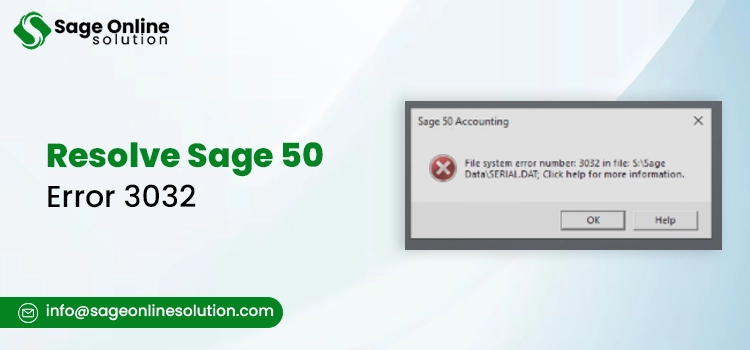
Sage 50 Error 3032 is a file system and database error that prevents the users from accessing Sage 50 or opening the company files. This error message normally occurs when the software is unable to start the database engine or access the necessary data files, which can primarily occur because of service issues, permissions, or even some configuration problems. In this blog we’ll walk you through over how to fix Sage 50 error 3032, so buckle up.
If you require professional help to deal with this error, call our certified Sage 50 error 3032 experts +1-844-341-4437 today.
To have an understanding of how to fix Sage 50 error 3032, and also to avoid recurring issues, knowing the root causes of it is needful. As said earlier, this error typically means that Sage 50 cannot access or initialize the database or company file, but why it happens can vary depending on your setup.
Below are the verified, and commonly reported causes of it:
1. Database Engine Service Not Running
If the Actian PSQL Workgroup Engine service, Sage’s database engine is stopped, Sage 50 cannot open or read the company files. This is one of the top reasons for File System Error 3032.
The are multiple reasons that can cause the service to stop, like:
In hosted scenarios, this engine must be running on the host machine.
You May Also Read: Sage 50 Error Connecting To Database Error
2. Incorrect Installation: Single-User vs Multi-User
One official explanation behind Sage 50 Error 3032 is installing the single-user version instead of the multi-user version in a shared environment.
3. Improper Pervasive/Database Initialization
If Pervasive or the database engine fails to initialize correctly, Sage 50 cannot open the database files, which in turn triggers this error.
This can happen when:
4. Corrupted Or Missing Company Files
Damage to critical company files like the .SAJ or .SAI data folders can prevent Sage from opening the file system properly.
The causes that are included in this are as follows:
5. Folder Permissions Or Insufficient File
If the Windows user account lacks the correct amount and type of Read/Write permissions for the Sage data folder or its subfolders, this could possibly result in Sage not being able to read important files, which in turn could raise error messages such as error code 3032. This often happens in:
6. Interference Of Antivirus Or Firewall
System security tools can be the reason of block Sage 50 or its database engine from accessing or reading certain files, especially after updates or configuration changes.
This can manifest as:
7. Network Connectivity Or Mapping Issues
In a network or shared drive environment, unstable or incorrect network configuration can cause Sage 50 error 3032 by preventing access to the shared data files.
This can happen due to:
8. Damaged Database Registry Or Configuration Errors
Errors in Sage’s internal settings, such as registry entries or database configuration files can prevent proper connection to the database engine.
Each of these can interrupt Sage 50’s ability to open, read, or process its database files, resulting in Sage 50 error 3032 message.
In this section we’ll take you through verified, practical solutions to resolve Sage 50 error 3032. Each step mentioned below can help eliminate the primary cause and get Sage 50 running again.
Important Note Before You Start: Always have a backup of your Sage company files before attempting any service changes or repairs. A copy ensures data safety if something needs to be restored.
Fix 1: Restart And Then Verify The Database Engine: Actian/Pervasive
One of the most common reasons behind Sage 50 Error 3032 is that the underlying database engine is not running right. The error often occurs when the database can’t initialize.
If services are disabled or not set to automatic, Sage won’t be able to start the database, leading to this error.
Fix 2: Run Sage Data Integrity Check
Sage also includes a built-in utility to fix minor data corruption. Below are the steps on how you can utilize it:
This can correct problems in company files that might otherwise trigger how to fix Sage 50 error 3032 query.
Fix 3: Verify Folder Permissions: Windows Security
If Sage can’t access the company directory, you’ll likely see issues like error 3032. To resolve it perform the following steps:
Fix 4: Use UNC Path Instead Of Mapped Drive
Mapped drive letters sometimes are bound to lose connection, especially after a reboot. Using the UNC path (e.g., \\SERVERNAME\SageData) is more reliable.
This prevents network interruptions that can cause Sage 50 error 3032.
Need not to worry, the steps might seem a little overwhelming, but that’s what we’re here for. Get in touch with our Sage 50 error 3032 experts +1-844-341-4437 right away, and let them take over for all your worries and hassle. It’ll all be done in an instant.
Fix 5: Turn Off System Antivirus Or Add Exclusions
Security softwares sometimes can blocks Sage’s database files or services. Temporarily disable or add exclusions for:
Fix 6: Repair Or Reinstall The Database Engine
Sometimes the database engine installation itself is corrupt. Performing a repair through Windows Settings can restore required components. Below are the steps to perform the repair:
If even repair doesn’t work, then a full reinstall might be needed, but only proceed with it if you have a backup.
Fix 7: Test Company File On Local Drive
Another thing you can do is to copy your company data folder to a local drive (C:\SageData) and try opening it from there. If this works and Sage opens the file locally, that means the issue is network related, not data corruption.
If these steps haven’t resolved the problem, and you’re still in search for the perfect one on how to fix Sage 50 error 3032, our certified Sage support team +1-844-341-4437 is ready to help you. Call our certified Sage 50 specialists now!
In some cases, Sage 50 Error 3032 doesn’t respond to common and all-so-known solutions. When standard solutions fail, advanced troubleshooting helps you dig deeper into issues that might be affecting system services, user profiles, or configuration environments.
1. Rebuild The Database Engine Configuration
If the database service fails to start repeatedly, the main reason could be unstable or corrupt configuration. To get rid of it follow the below given steps:
◦ net stop wpgsrvr
◦ net start wpgsrvr
This forces the database engine to recreate its configuration files.
Note: The actual service name may vary (often Actian PSQL Workgroup Engine). Confirm in Windows Services.
This method aligns with advanced steps users apply when the database engine won’t start, which is a known contributor to Sage 50 error 3032.
2. Create a Fresh Windows User Profile
Windows user profiles that are corrupt or restricted can block access paths that are required by Sage. Creating a new profile often resolves hidden permission issues:
If Sage is able to open the company file here without facing any errors, then it clearly specifies that the issue was likely profile specific. This method is majorly helpful if the directory permissions are in order but Sage is still having problems with access.
3. Restore From The Backup
If the company file remains inaccessible despite all solutions and data integrity checks, restoring from a reliable backup may become a compulsion.
Make sure to only restore backups you trust, restoring a corrupt backup will simply reproduce the error.
4. Reinstall The Complete Database Engine
If the database configuration and repair don’t work, uninstalling and reinstalling the engine can reset all dependencies.
Note: This is more advanced and should be attempted with good backups and, preferably, guidance from support. So for this contact our Sage 50 specialists +1-844-341-4437.
Each of these steps addresses deeper system or configuration issues that can contribute to Sage 50 Error 3032, especially in complex environments.
Prevention of Sage 50 error 3032 begins with the maintenance of a stable database environment and secure file access. Some of the steps that can be taken for the prevention of this error are as follows:
1. Make Sure The Database Engine Is Running: The Actian/Pervasive database service must remain active at any cost. Set it to Automatic Startup in Windows Services and then confirm that it restarts after system updates or reboots. Since service failure is a primary cause of Sage 50 Error 3032, performing this single step can prevent many occurrences.
2. Use The Correct Installation Type: Accounting Advice confirms that installing the single-user version in a multi-user environment can cause database initialization errors.
If multiple users are on board to access the file, make sure to:
3. Maintain Proper Folder Permissions: File access restrictions often trigger file system errors.
Make sure all users that are authorized possess full Control over Sage data folder, and also make sure to verify permissions after major Windows updates.
4. Avoid Mapped Drive Instability: Mapped drives can disconnect after reboots.
Using a stable UNC path lessens file access interruptions that contribute to the database errors.
5. Schedule Regular Backups: While backups won’t prevent the error in a direct manner, they sure do protect your data if corruption occurs due to improper shutdowns or system failures.
6. Close Sage Properly Before Shutdown: Improper shutdowns can really harm company data files. So, always exit Sage before restarting or powering off the system.
If you want to proactively secure your system against recurring Sage 50 error 3032 disruptions, our certified Sage 50 professionals can review your setup and configure it correctly.
Prevent future Sage issues with expert guidance for Sage 50 errors by calling +1-844-341-4437 today.
In order to provide a practical summary of all the above, Sage 50 Error 3032 can be described as a database initialization or file access problem, which is commonly caused by a halted database engine, incorrect installation type, or permission conflicts. The above-mentioned confirmed troubleshooting steps should resolve the issue. Addressing it promptly prevents workflow disruption.
And if you’re still experiencing Sage 50 Error 3032? Get fast, professional resolution from our certified Sage experts today by calling +1-844-341-4437.
Read Here:
Sage 50 File System Error 3110
Frequently Asked Questions
It may be. Although service failure is a common occurrence, it may also be caused by corrupted company files or damaged database components, especially if the system has crashed or shut down improperly.
Yes. Windows updates may alter system services or folder permissions, which can prevent the database engine from initializing properly and lead to this file system error.
The quickest fix known is to normally restart the Actian/Pervasive database service in Windows Services and confirming that it’s set to Automatic. This directly resolves many initialization-related cases.
Yes, installing a single-user version in a multi-user environment can cause database conflicts, increasing the likelihood of Sage 50 Error 3032 occurring.

Mar 02, 2026
Mar 02, 2026
Feb 25, 2026
Feb 20, 2026
Feb 19, 2026
© Copyright 2026 Sage Online Solution | All Rights Reserved
US
UK

