By Antonio Garcia Dec 04, 2023 6 min
Concerning the current and growing technology trends, businesses have smartly switched to software for handling their daily business chores. Sage 50 is one of the software that business accountants popularly use. Though Sage 50 is a commendable accounting software, users still face problems while installing the problem, leading to Sage 50 installation error 1935. Are you getting the same technical hiccup while installing the software? If yes, you must continue reading this blog post.
In this post, we will let you know the prominent causes of this technical glitch and the preventive measures to troubleshoot the issue permanently.
Do you get continuous interruption due to Sage 50 error 1935 while installing the Sage 50 accounting software? If yes, you can ask for professional help to root the error better. Call our team at +1-844-341-4437.
As we’ve discussed above, Sage 50 Installation error 1935 is a technical glitch that prevents users from installing the Sage 50 software. At the time of installation, users face an error message reading, “Error 1935. An error occurred during the installation of assembly component {C6357C55-7461-3D51-9AE5-FD71CA24027A}. HRESULT: 0x80070BC9.”
Multiple reasons are responsible for this installation issue, and the disabled .NET Framework Microsoft component is one of the major causes. If you’re also dealing with this issue, immediately troubleshoot this problem by taking the required actions.
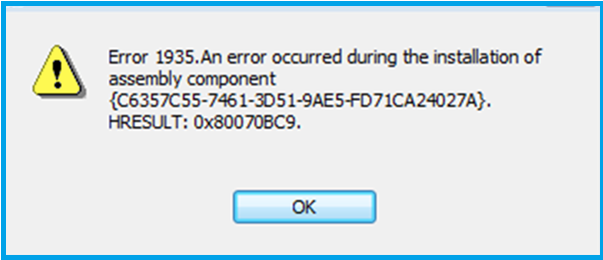 Sage 50 Installation Error 1935
Also Read: Migrate Sage 50 to Sage Intacct
Apart from the disabled Microsoft .NET Framework component, the following technical problems are also the main causes of error 1935 Sage 50. Have a look:
The section below is all about troubleshooting the annoying and interrupting Sage 50 installation error 1935. If one method fails, switch to the next one and carefully perform the troubleshooting accordingly.
Often, the third-party applications running in the background disturb the Sage 50 application installation. So, carry out the procedure below and stop running the background applications. For this:
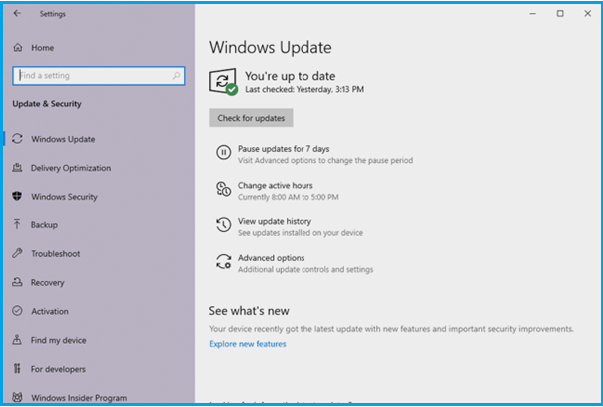 Windows Update
Ensure the compatibility between your Windows Operating System and the Sage 50 software. Thus, it’s important to update your Windows OS before you start installing Sage 50. Here, we’ve given the procedure to update the Windows.
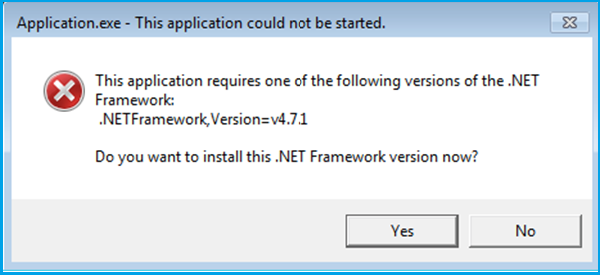 Dot Net Framework
Microsoft components, including .NET Framework, are essential for installing software programs such as Sage 50 on the computer system. So, if this component is disabled on your system, verify and enable the same. For this, follow the below steps:
As we discussed earlier, you will receive errors if you’ve downloaded the corrupted or damaged Sage 50 installation files. So, troubleshoot error 1935 by fixing these installation file issues:
Don’t worry! If the above solutions didn’t work and you’re still encountering the same installation problem, we have an alternate solution to resolve error 1935. Check this out:
Antivirus or other installed security software programs on your computer system are designed to protect your system from any potential viruses, malicious services, or other threats. And so these programs may possibly interrupt you from downloading the Sage 50 software. That’s why it’s better to temporarily disable these security programs and antivirus while installing the Sage 50 software. For your convenience, below we have instructed you how to disable these programs temporarily:
Also Read: Integrate with Microsoft Programs
If you’re searching for Sage 50 installation tips, have a look at the considerations below:
Ensure the minimum system requirements, including:
Once you are set with all these essential system requirements, continue downloading and installing the Sage 50 software.
[tfnshortcode]
So, what is the actual cause of the Sage 50 installation error 1935? Now, troubleshooting the issue with the help of the methods above must be easy for you. Right? But if it’s not and you need further help getting rid of this Sage 50 installation glitch, connect with us. Talk to our Sage 50 professionals via Live Chat Support and get the resolution of your queries instantly.
What does the Sage 50 error 1935 mean?
Basically, the Sage 50 error code 1935 is an installation error that erupts if the .NET Framework is disabled or the installation files are corrupted. Eventually, users failed to install the Sage 50, leading to the 1935 error.
Does Firewall Defender prevent users from installing the Sage 50 software?
Yes, Windows Firewall Defender or other security software may prevent you from installing the Sage 50 software. So, it’s better to disable them for a while and then begin installation.
What common issues can provoke Sage 20 installation error 1935?
The following reasons may trigger Sage 50 error code 1935:
What preventive measures can help me avoid Sage 50 installation errors?
You must check and update your Windows, set up a strong and stable internet connection on your system, and enable the required .NET Framework Microsoft component.
What can help me further if the methods given above fail to troubleshoot error 1935 Sage 50?
Don’t be afraid! Our professional team is here to assist and help you professionally. Just ring us at +1-844-341-4437 or reach out to any of our Sage expert technicians via Live Chat Support.

Mar 02, 2026
Mar 02, 2026
Feb 25, 2026
Feb 20, 2026
Feb 19, 2026
© Copyright 2026 Sage Online Solution | All Rights Reserved
US
UK

